


Libre by Abbott
4.46.99K Reviews
App Specs
- Version
- 1.3.0
- Updated On
- License
- Free
- Downloads
- 500,000+
- Developer
- Abbott Diabetes Care Inc.
- Categories
- Medical
- Platform
- Android
Screenshots
 Analysis by AppCompare
When I judge a glucose-monitoring app, I look beyond whether it can show a number. The useful question is whether I can understand that number in the middle of an ordinary day, and whether the app makes the information manageable rather than overwhelming. Libre by Abbott is a medical app from Abbott Diabetes Care Inc. built around the FreeStyle Libre system. It is free, rated for Everyone, and has an average rating of 4.3 from around 29,000 ratings, with more than 500,000 installs. Those figures suggest a well-used app, but the deciding factor for me is whether its sensor-based approach fits the way you actually manage glucose.
Who benefits most from a sensor-based routine
I’d consider Libre if I already use a compatible FreeStyle Libre sensor and want a phone-based way to check glucose information and look back at patterns. The app is most relevant to someone who checks repeatedly during a normal day, or who wants a clearer record to discuss with a healthcare provider. It is not a stand-alone glucose meter: the sensor is central to the experience, so downloading the app alone does not provide readings.
That distinction matters when comparing it with the usual alternatives. A traditional finger-stick meter is a more direct choice if you want to measure with a meter and test strips rather than rely on a sensor-and-phone routine. Other sensor systems may suit people whose existing equipment is from a different system. I would choose based on the sensor and care plan that fit me, not on the assumption that every glucose app can read every device.
Reading a trend without overreacting
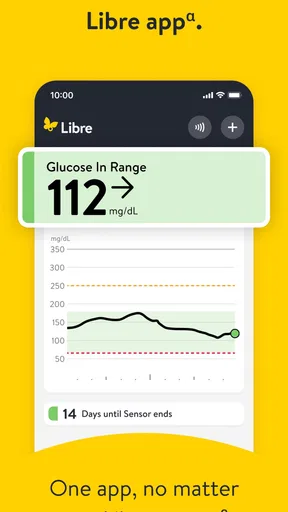
A current reading is only one part of a decision. The trend arrow and history can help put it in context, but I would treat them as information to interpret carefully, not as a substitute for clinical advice. One practical habit is to check the direction and recent history alongside the current value instead of reacting to a single moment in isolation. If a reading seems inconsistent with how I feel or with the guidance I have from my care team, I would follow that guidance rather than assume the phone display settles the question.
For example, on a busy morning I might check before heading out, then later review the day’s pattern rather than trying to remember every reading. That makes the history more useful: I can notice a recurring time-of-day pattern and bring it up at an appointment. A log cannot explain every cause by itself, though. Food, activity, illness, stress, and medication decisions belong in the wider conversation with a clinician, not in a guess based on one graph.
What to check before relying on it
Because the sensor is part of the system, I would confirm that the particular phone and sensor setup I plan to use are compatible before making the app my main routine. Libre is currently at version 1.3.0 and requires Android 11 or later on Android. The release date is April 7, 2025. Compatibility is more than an installation question: a phone that can download an app is not automatically a confirmed match for every sensor workflow.
I would also make a small routine for practical moments: keep the phone accessible when I expect to check, and review the app’s setup instructions before depending on it away from home. That is especially sensible before travel, a long work shift, or a day when I cannot easily pause. A sensor-based method can reduce the need for repeated finger checks in its intended use, but it still depends on having the relevant equipment and a phone workflow that works for you.
Worth Reading Before You Choose

EA SPORTS FC Mobile 26 Is a Bigger Football Game, but It Takes Time

Flipboard Shows What News Apps Must Do Beyond the Feed

Switching to Android Auto Means Rethinking Your Driving Routine

Google Calendar Makes a Crowded Week Easier to Manage

Ludo King Makes the Most of the Minutes Between Plans

Baby Panda World Brings Quick Play to Modern Phones, but Its Game Library Feels Busy
The Basics of Libre
First off, let’s talk about what Libre by Abbott really is. It’s a companion app for the FreeStyle Libre system, which includes a small sensor that you wear on your body. The app reads the sensor data, providing you with real-time glucose information. No more finger pricks, folks! Just a quick scan with your phone, and you’ve got all the data you need. It’s like having a personal health assistant in your pocket.
User-Friendly Interface
The app’s interface is incredibly intuitive. Upon launching it, you’ll find a clean and straightforward layout that won’t leave you scratching your head. The home screen displays your current glucose reading, along with a trend arrow to show which way your levels are heading. It’s super easy to navigate, and you don’t need to be a tech whiz to figure it out.
What I really appreciate is the simplicity of the design. Everything is laid out in a way that makes sense, and the app doesn’t overwhelm you with unnecessary features. You get what you need, when you need it. Libre by Abbott strikes the perfect balance between functionality and user-friendliness.
Data at Your Fingertips
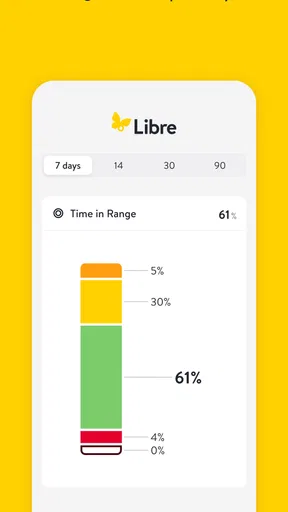
Now, let’s chat about the data. The app provides detailed insights into your glucose patterns. You can view your readings over the past day, week, or even month. Want to know how your levels reacted to that giant bowl of pasta you had for lunch? No problem! Just check the history log.
One of my favorite features is the ability to generate reports. These are perfect for sharing with your healthcare provider. The reports are comprehensive and easy to understand, giving you a clear picture of your glucose levels over time. It’s like having a detailed health diary, minus all the writing.
Set Your Targets
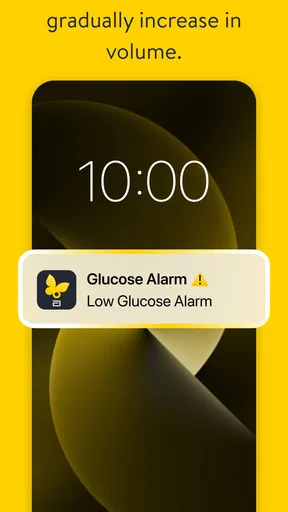
Setting glucose targets is a breeze with Libre. You can customize your own goals and receive alerts if your levels go too high or too low. This feature is particularly handy if you’re managing diabetes and need to stay within a certain range. The notifications are subtle yet effective, ensuring you’re always in the loop without being intrusive.
Connectivity and Compatibility
Libre by Abbott works seamlessly with both Android and iOS devices. The connectivity is solid, and I haven’t experienced any hiccups while syncing the app with the sensor. It’s also designed to integrate with other health apps, which is a huge plus if you’re someone who likes to keep all your health data in one place.
The app also supports multiple languages, making it accessible to a diverse range of users. Whether you’re a tech-savvy millennial or someone who’s not as comfortable with technology, Libre has got you covered.
Using it across different abilities and settings
A simple screen can help when I want to check information quickly, but ease of use depends on the person and situation. If small text, glare, or color contrast makes phone screens difficult for you, test the display in the lighting where you normally check it. I would also avoid assuming that a trend arrow or color cue will be equally clear to everyone; make sure the numerical reading and any other information you rely on are comfortable to interpret.
For someone with limited dexterity, the practical question is whether they can comfortably handle their phone and complete the sensor interaction required by their setup. I would try that routine at home before counting on it while walking, carrying bags, or rushing between tasks. If a family member or caregiver helps, agree on how readings and reports will be reviewed together, while keeping the person using the app involved in decisions about their care.
Sound, vibration, and screen alerts can be helpful in some environments and easy to miss or disruptive in others. I would check how notifications behave on my own phone and avoid treating an alert as the only way to stay aware of glucose information. In a meeting, a noisy street, or a quiet room, the same notification may be experienced very differently. A deliberate check-in routine can be more dependable than expecting every alert to be noticed.
Where the convenience has limits
The app’s most important limitation is also part of its design: it is tied to the FreeStyle Libre sensor system. If I do not use that sensor, or if I prefer a meter-based process, this is not an all-purpose replacement. The phone also becomes part of the routine, so battery, access, and comfort with checking a screen matter. Before relying on it for a full day away from home, I would make sure my usual phone habits support that workflow.
Reports can make a conversation with a clinician more concrete, but they do not diagnose a problem or explain every fluctuation. I would bring questions about patterns to a healthcare professional rather than changing treatment based solely on an app view. Similarly, alerts can draw attention to a reading, but they do not remove the need to understand the care plan I have been given. That boundary is important in any medical app, especially one that presents information in a quick, confident-looking format.
There is also a learning curve in turning a history into useful observations. I would avoid trying to explain every rise or dip immediately. Instead, note a repeated pattern, consider what was happening around it, and ask whether it is worth discussing at the next appointment. That approach makes the app’s record more useful without encouraging me to treat correlation as a clear cause.
Final Thoughts
All in all, Libre by Abbott is a fantastic tool for anyone needing to monitor their glucose levels regularly. Its user-friendly interface, comprehensive data reports, and reliable connectivity make it a standout choice in the world of health apps. Sure, you need the FreeStyle Libre sensor to make the most of it, but if you’ve already got one, this app is a no-brainer.
So, if you’re tired of the constant finger pricking and want a more convenient way to keep track of your health, give Libre a shot. It’s like having a mini glucose monitoring lab right on your smartphone. Trust me, you won’t be disappointed.
My inclusive verdict
I’d recommend Libre to someone who already uses the FreeStyle Libre system, is comfortable checking a phone, and wants an accessible record to review between appointments. It may be less suitable for someone who cannot comfortably use the phone interaction, needs a different sensor ecosystem, or prefers a traditional meter workflow. In those cases, another monitoring option chosen with a healthcare professional may be a better fit.
The app’s straightforward presentation and history can make glucose information easier to bring into everyday conversations, but inclusive use is not automatic: screen legibility, dexterity, alerts, and the setting all affect whether the routine works. My practical advice is to test the complete process in the conditions where you’ll use it, rather than judging it only by a quick look at the home screen. When the sensor, phone, and personal care routine line up, Libre can be a useful companion; when they do not, convenience alone is not enough reason to force the fit.
Pros
- Easy-to-use interface for tracking glucose levels.
- Real-time glucose monitoring with quick updates.
- Customizable alerts for high and low glucose.
- No need for finger pricks with the sensor.
- Comprehensive data analytics for better insights.
Cons
- Requires a compatible smartphone for full features.
- Sensors can be costly over time.
- Limited compatibility with older devices.
- App setup can be complex for new users.
- Occasional connectivity issues with the sensor.
FAQs for Libre by Abbott
What is the main purpose of the Libre by Abbott app?
The Libre by Abbott app is designed to work seamlessly with Abbott's FreeStyle Libre Flash Glucose Monitoring System. Its primary purpose is to help users track and manage their glucose levels in real-time. By scanning the sensor with the app, users can view their current glucose levels, trends, and patterns, making diabetes management more convenient and efficient.
Is the Libre app compatible with all smartphones?
The Libre by Abbott app is compatible with most Android and iOS devices, but it's essential to check the specific system requirements before downloading. Ensure your phone's operating system is up to date and that it has the necessary NFC functionality for scanning. Compatibility information can typically be found on the app’s download page in the Google Play Store or Apple App Store.
How secure is my data on the Libre app?
Abbott prioritizes user privacy and data security in the Libre app. The app employs advanced encryption methods to protect your data. Users can rest assured that their personal health information is kept confidential and secure. Additionally, you have the option to set up a personal identification number (PIN) or use biometric authentication, such as fingerprint recognition, to enhance security.
Can I share my glucose data with others using the Libre app?
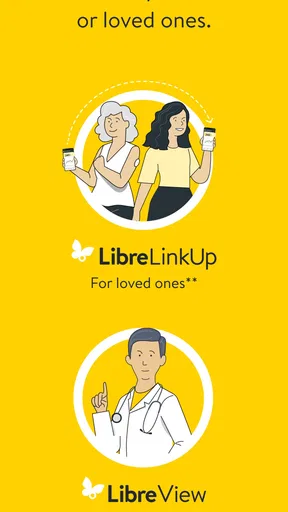
Yes, the Libre by Abbott app allows you to share your glucose data with healthcare professionals, family, or caregivers. You can do this by generating detailed reports or granting access through the LibreView system. This feature is particularly useful for those who require regular monitoring and support in managing their diabetes effectively.
What should I do if the app is not reading my glucose sensor?
If the Libre app is not reading your glucose sensor, first ensure that your phone’s NFC is enabled. Try restarting your device, and ensure the sensor is properly placed and activated. If the issue persists, consult the app’s help section for troubleshooting tips or contact Abbott’s customer support for further assistance. Regular updates might also resolve connectivity issues.


